2014年3月30日日曜日

VIP Hackathon and Civic Information API

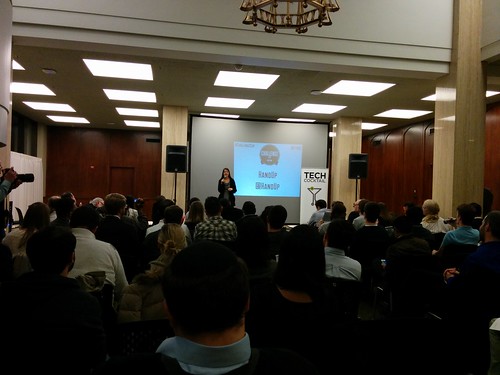
On 3/28 and 29th, I joined Voting Information Project Hackathon and gave a short talk about Civic Information API.

This is my slides, and I will walk through them on this post so that those who did not join the hackathon can follow:


Why does Google care about Voting Information? Because our users care. At times of election, we saw people searching with search query "where do I vote?" So we are providing tools for people to know where to go to vote.


There are 2 portions to Civic Information API: acquiring election information, and acquiring data about who your representative is.

All of the documentation and information you need can be found here:
https://developers.google.com/civic-information/


1. Acquiring Election data

There are 2 APIs for this. 

1. You can use electionQuery to obtain a list of valid election IDs.
2. Then you can use voterInfoQuery with an address to obtain information for a selected election.

Election data will not be acquired if the election does not exist, but we want you to be able to build apps even when there is no election happening. Therefore, "election ID 2000" exists. This is test data mocking NYC Mayoral 2013 data, so if you put address of NYC, API will return polling places for you.

Open Source Projects

We love Open Source. So we have 2 tools you can use which is Open Sourced: Voter Information Tool and Election Results Maps.

Voter Information Tool 
code.google.com/p/voter-info-tool


Election Results Maps
code.google.com/p/election-maps

2. Acquiring data on representatives

In order to acquire data about who the representative is in the address specified, you use representativeInfoQuery. By specifying location, you can acquire information on federal, state, county and municipal elected officials.

There is a nifty sample app for you to see how it works.

Map Your Representatives

You enter the address


In this case I put "901 Mission Street San Francisco", the address of the hackathon venue "Impact Hub".

It pulls up the map, and lets you select whether you are looking for your representative on the national level, state level or county level.


And lists the representatives of that address.


If you click on the representative, you can get further information about that representative.


Other examples include Change.org that implemented Decision Makers feature which allows users to direct a petition to their elected representative and lists that petition publicly on the representative's profile page. As a result, the leader has better insight into the issues being discussed in their district, and a new channel to respond to constituents.


PopVox helps users share their opinions on bills with their Congressional Representatives in a meaningful format. PopVox uses the API to connect the user to the correct Congressional District. Because PopVox verifies that users are real constituents, the opinions shared with elected officials have more impact on the political process.


Useful Information on Civic Information API

-All of the documentation on both APIs are here:
https://developers.google.com/civic-information/

-If you need more quota, you can go to APIs Console and fill in the form to increase quota:
https://console.developers.google.com/project

-There is a mailing list (Google Groups) to share information and get support on this API:
https://groups.google.com/forum/#!forum/google-civicinfo-api

Other useful tools

Google Fusion Tables enables you to visualize on charts, maps and network graph very easily.
http://www.google.com/fusiontables

Freebase & Knowledge Graph enables you to acquire information about the politicians. Freebase in an entity graph of people, places and things, built by a community that loves open data, and it powers the Knowledge Graph.
freebase.com

Google Cloud Platform enable developers to build, test and deploy applications on Google's highly-scalable and reliable infrastructure. Products include Google Compute Engine, Google App Engine, Storage services including Cloud SQL and Cloud Storage, and big data analytics tool Big Query, etc.

Participants of VIP Hackathon receives $500 credit to build their apps by going to starterpack site and using promo code "voting-hack".


Disclaimer: The opinions expressed here are my own, and do not reflect those of my employer. -Fumi Yamazaki

2014年3月28日金曜日

Lessons from Crisis Response in Japan: Matching supplies

Matching supplies is hard in a chaotic situation during and after natural disaster.

Power of the Internet was realized during crisis response in Japan, but there were many lessons learned there too. Many people tweeted what they needed, and supplies were sent to them, but controlling the supply and demand was difficult so some towns received 10 years worth of diapers that they could not store. Many people started to use Amazon Wishlist which worked well.

There were locals who were setting up websites to clarify what they want people to send - such as food, diapers, etc. There was a wiki that gathered best practices to send supplies to areas hit by disaster, as well as list of the places that are accepting supply donations.

What many people don't realize is that sending supplies should be carefully done, and receiving supplies and distributing them require expertise, otherwise it will be a nightmare. We have seen several examples of those incidents.

So let's observe the problems that happened:

Too much supplies that cities are unable to cope with and piled up.

I went to one of the city halls of a bigger city, and they said they were receiving many supplies that is piling up in the storage, they are working on trying to distribute those supplies to evacuation centers restlessly, but are not able to keep up with the massive supplies.

Volunteer centers that effectively distributed supplies.

In July 2011, I went to host a hackathon in a volunteer center in Toono called Toono Magokoro Net which was gathering many volunteers nationwide and sending them off to disaster-hit areas every day. While I was having a meeting with the director there- Mr. Kazuhiko Tada, one of the city officials from the disaster came and asked if they are able to distribute 4,000 sausages. "The sausages are going to go bad soon, but we can't distribute so many. If we ship them here, will you be able to distribute them?" Toono Magokoro Net sends off shuttles volunteers to evacuation centers everyday, and there are much more than 4,000 evacuees in those centers. "Of course. Please send it to us." replied Tada-san.

HackForJapan遠野

HackForJapan遠野

Using Twitter effectively

In Japan, Twitter was amass with information about how to help people in Tohoku. Some people tweeted what they needed, and asking to send them. The problem is, when they tweet, they get too much supplies since information is uncontrollable. "Please stop sending diapers- we have received 10 years worth of diapers already"- power of Twitter was actually too strong.

Tada-san was not tech-savvy, but he was clever. He was observing the situation. "Getting local governments control supply and demand will not work, because right after the disaster, speed is important. Governments' process is slow. If you need something during disaster, you need it immediately, and getting them quickly is more important than controlling them." says Tada-san.

What he learned was that Information flow on internet is extremely speedy. Therefore, he does not tweet until the very last minute until supply is gone. If you worry that you might not have enough and tweet too early or ask for too many, you will not have places to store everything. If you tweet just before supplies are all gone, there will be massive supply arriving that is beyond what they can use. Then, he will provide those excessive supplies to neighboring towns and cities so that he can control afterwards.

Too much bureaucracy and "fairness"

One of the problems that we saw after 2011 earthquake was trying to push too much bureaucracy and fairness. "We have 100 evacuees, so we can't accept 80 rice balls because it will cause unfairness." Seriously? Just give 80 rice balls to 80 of them and give the other 20 sandwiches. But this was reality. Under the word "fairness" lots of supplies were not accepted.

Efficiency over Fairness, and trust the people

In April 2011, I visited Aizu in Fukushima, and met Mr. Tadashi Egawa who works for the city of Aizu. This is the supply center that he created which really amazed me.

会津

Right after the earthquake, he knew there will be massive evacuation, and he knew there would be massive supplies that he would have to distribute. First thing he did was to go and get the red cones. He used the empty gymnasium to build supply center, and divided areas with the huge cones so that people will be able to know where the cleaning materials are, kitchenware are, clothes are for women, men, girls and boys etc in clusters.

Evacuees can visit this supply center and take only what they actually need. Some people take a bit more, some people takes a bit less, they did not limit the number of things they can take, but they did have people at the door to ensure visitors are behaving in a good manner. Nobody was acting evil and were taking only what they needed.

This is the "big red cone".

会津

"Children's area" with lots of diapers.

会津

Using Amazon Wishlist

In order to avoid un-necessary supplies coming in and eating the storage, and necessary things not coming in, many people started to use Amazon Wishlist to match what they want in the disaster-hit area and what other people can send to them.

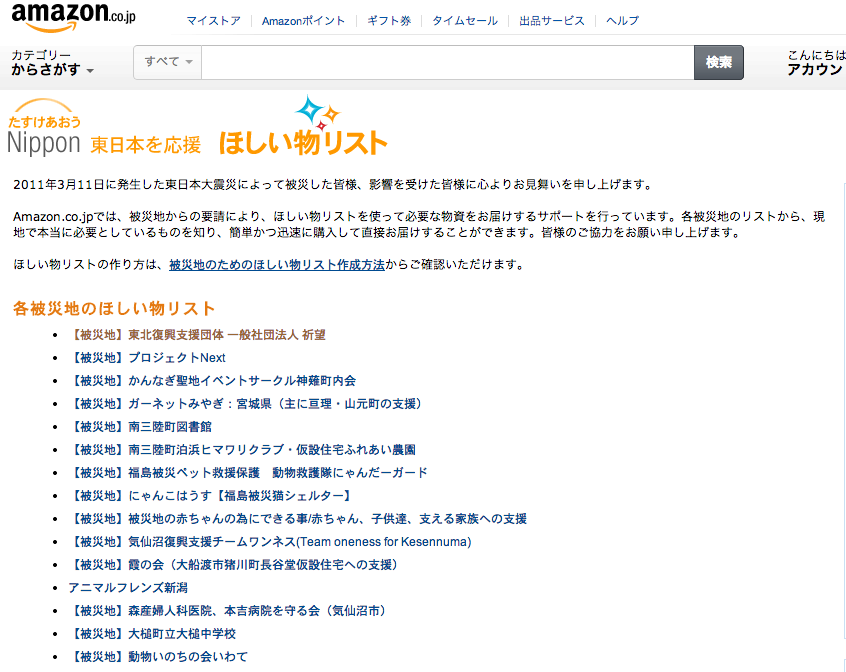
This is the list of disaster relief for Tohoku Amazon Wishlist.
http://www.amazon.co.jp/gp/feature.html?docId=3077074166


And this is how it looks like. The evacuation center in Ogachi district and evacuees in the neighboring area are requesting 70 toilet paper rolls (of which 33 received), and 256 bags of rice (of which 218 received).


Similar project happened when Hurricane Sandy hit New York.

Occupy Sandy Hacks Amazon's Wedding Registry (in a Good Way)

This is their Amazon Wedding Registry page:
http://www.amazon.com/registry/wedding/32TAA123PJR42

You can see they are gathering supplies in masses, and they are going to be distributing them. Asked for 850 hand warmers (of which 717 received), asked for 200 safety goggles (of which 157 received), asked for 850 cleaning cloths (of which 841 received).


Medical supplies matching commander volunteering remotely from Australia

Lastly, I'd like to give an answer to the question whether you have to be in the same country or on the grounds to help. The answer is a no.

In the article "Internet Enabled Remote Volunteer Activities(ja)" that my friends +Nobuyuki Hayashi and +Tatsuya Yamaji put together, they introduce one great example of Wilson Naomi. Wilson-san who was a nurse in Australia when the earthquake happened. She started to gather information as well as donation, and realized that nutritional supplements were lacking. Specifically, "Ensure" which is necessary to send nutrition by tube to patients who cannot eat by themselves, is necessary and lack of it would risk peoples' lives. To be honest, Wilson-san was not tech savvy- didn't use anything like blogs, Twitter nor Facebook before the earthquake, and in the past 3 years exchanged only 200 e-mails total. But she started what she can do- she started sending emails to ask for help, and raised 1 million yen in 2 weeks to purchase Ensure and sent them to Tohoku.

She was then asked to help a supply-matching site on delivering equipments to hospitals in Tohoku such as medical equipments, medicine, medical beds and desks and chairs etc.

When dealing with supplies in disaster struck areas, it is not true that the more supplies you get is better. What is important is matching the supplies to those who need them. In this case, medical knowledge and experience was necessary in understanding the local needs and delivering exactly what they need, and Wilson-san started to take the role as commander.

She did not use special tools for this- basically it was emails, mailing lists, blogs and Twitter. She asked via email of the needs, and used Google Maps to specify where the place in need was, where the supplier was, where the volunteer staffs were, and coordinated the delivery. She exchanged more than 10,000 emails during March to December 2011 while she was in control of the medical supply deliveries.

Lessons learned:
It is not the technology or tools that helps, it is the people that helps. Coordinator with the right knowledge is key. If we have the right technology and tools, those people will be able to connect and help beyond physical constraints such as time and location. Wilson-san's work as volunteer staff from Australia using her spare time as "commander of medical equipments deliver in Tohoku" was a great evidence of that.

Disclaimer: The opinions expressed here are my own, and do not reflect those of my employer. -Fumi Yamazaki

DIY T-shirts

I have many geek T-shirts that are very big for me, so I started to play with them.

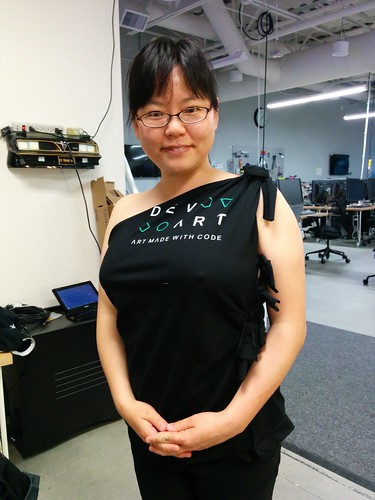
DevArt T-shirt, XL... way too large for me.


So, looking at this blog post, I started to cut it.

Wobisobi: No Sew, One Shoulder Shirt. DIY

Marking with chalk.


Cut.


Marking the sides.


Cut.


And this is the result. Yay!

T-shirt

 Disclaimer: The opinions expressed here are my own, and do not reflect those of my employer. -Fumi Yamazaki

2014年3月24日月曜日

Lessons from Crisis Response in Japan: Finding Missing People

What we all know is that when natural disaster happens, people will be looking for their loved ones. At Google , we had been launching Google Person Finder for various crisis.

The big earthquake in Japan happened on 2011/3/11 at 14:46, the Googlers in Japan jumped on to translate the site, and 1 hour and 46 minutes later at 16:32 Person Finder was launched in Japanese local language.


However, translating the menu to local language alone will not solve many of the localization issues- so the team started to work on various enhancements.

1. Feature phones

Initial Person Finder was not usable from feature phones, and many people in Tohoku did not have smartphones, so this was crucial. Japan is a very mobile-savvy country, and hence there are many feature phones with various browser using various encoding, so coping with those differences needed local expertise.

2. Search

Although initial Person Finder was equipped with minimum internationalization, when people's names were more than 5 letters in Chinese character, it was not searchable. Also, different Chinese character have different pronunciation in Japanese, but pronunciation (yomigana) was not equipped as input nor in the search functions in the initial phase of Person Finder. In Japan, some people use different characters for same names- for example "渡辺" and "渡邉" are both used for the name "Watanabe" and search function needs to be able to cope with them. Making people searchable by phone numbers, making it searchable by romaji (alphabet), making it searchable by combination of name + address were all functions that were added in Japan based on people's needs.

3. Data conversion - analogue to digital

In the evacuation centers, information about people was shared on paper on walls. They were not digital, they were not online, nor searchable.


The team called out to take the pictures of those hand-written papers at evacuation centers with camera phones, and send those pictures by email which would be uploaded to photo-sharing site Picasa. Volunteers all over Japan (and sometimes outside Japan) helped to transcribe them.


Initially, transcribing by machine using OCR was tried, but since the handwritings were written in a hurry and not clean nor standardized, the quality was low. It needed to be done manually. So Google employees tried to transcribe them but there were overwhelmingly more photos than they could transcribe. Crowdsourcing was the best solution for this. External volunteers started to make rules, create lists of the photos that are not yet transcribed, and organically improved the manuals. This wiki was not created by Google- it was created collaboratively by the numerous volunteered that helped, instructing how to find photos that are not taken care of, how to announce they are working on specific photo (to avoid duplicate work) and how to announce it is finished, formatting of text, how to register to Person Finder database, how to double check the data, and how to triple check.


Over 5,000 volunteers helped to transcribe over 10,000 photos with over 140,000 records of people.

Lessons learned:
1) Adapt to reality - if people don't have Internet on the grounds, we have to be creative and adapt to the reality.
2) Build the platform- if you build the platform, people will be able to help voluntarily.
3) Trust the users and delegate
4) Unify communication methods - there were various mailing lists and communications in Japan's case- need to learn and unify next time.
5) Crowdsourced data input is a great way for people to be involved in helping -especially for people who cannot physically go and help and feeling guilty

4. Data migration

Person Finder data on Tohoku earthquake counted 670,000 records, which consists of 3 different data sources:
1) Data that users input to Person Finder manually
2) Data transcribed from the photos of evacuation centers, mentioned above
3) Data provided by mass media and other organizations
Mass media: NHK, which is the national broadcaster of Japan was calling out to provide whereabouts of people, and released those data on TV and radio but those data are not searchable. Mainichi News Paper provided the data from their reporters' memo from their visits to evacuation centers. Asahi News Paper had their data on the website, so Googlers wrote scripts to crawl those data.
Mobile carriers: Mobile phone companies operated their own database for people using their disaster BBS systems, which later became searchable via Person Finder, using PFIF - People Finder Interchange Format.
Police: Police was also gathering data on whereabouts of people, which later became searchable via Person Finder.
Local governments: Local governments had their own data of people, which later became searchable via Person Finder.

Lessons learned:
1) Standards, common format and interoperability is key
2) One "goto" site is important
3) Collaboration and preparation is needed before crisis happens ("Today" is the best time to start collaborating!)

One of my friends lives in Tokyo but her family is in Kamaishi, a town that was horribly struck by the tsunami. She once told me "Back then, mobile phone was dead and I couldn't reach them. We were not allowed to go to that area. I sent e-mail but they were not responding. There was no way for me to find out if my parents were dead or alive for several days. I was so worried that I was getting out of my mind. Then, someone put their names in Person Finder and I was able to find they were alive. I don't know how to thank Google Person Finder enough." I'm sure there are many more stories like this, but this is why we keep responding to disasters.

Disclaimer: The opinions expressed here are my own, and do not reflect those of my employer. -Fumi Yamazaki

2014年3月8日土曜日

Ellen's selfie

During the Oscars this year, Ellen DeGeneres tweeted with a selfie photo with lots of movie stars, to make the most retweeted record. It was retweeted more than 3 million times (3,325,103 as of today) and counting.


It has also started a series of parodies including the Simpsons, which was retweeted by Ellen herself:

Lego version!

And another one!

Ellen's Oscar selfie - LEGO edition!

Grumpy cat...

Snoopy...

Doctor Who..

BTW, it seems that the most retweeted Tweet before Ellen's one was President Barak Obama's one with 781,617 tweets.
Kudos to the Twittter eng team recovering Twitter after Ellen literally broke it ;)

Disclaimer: The opinions expressed here are my own, and do not reflect those of my employer. -Fumi Yamazaki

2014年2月28日金曜日

#challengecup San Francisco

1776, a startup incubator based in Washington DC is hosting a global startup event called ChallengeCup.

They've toured the regional competitions in Washington DC, Chicago, Moscow, Berlin, Boston, New York, Los Angeles, London, Austin, Denver, Sao Paulo, Cape Town, Tel Aviv, Beijing, New Delhi and San Francsico. SF is the last stop of the tour and was hosted today. The winners from all of the venues will be invited to the global tournament held in Washington DC in May.


The format of this challenge cup is that the local startups apply, 1776 pre-screens them (in case of SF, they had over 100 applications and narrowed to 22) and on the day of the challenge the startups will have 1 minute each to pitch, judges will select 2 nominees from each category (education, energy, health and smart cities) and those nominees will each have 5 minutes to present, judges have 3 minutes to ask questions and finalists are determined.

Challengecup

Education:

Winner: Uclass is a venture-backed, Common-Core-lesson marketplace that aims to disrupt the curriculum industry. On UClass, both teachers and textbook companies sell their vetted resources in bite-sized formats.

Runner up: K-12Nest is a service to ask questions and collaborate

Energy:

Winner: Enact Systems is a home-energy marketplace that allows you to plan money-saving projects, view live bids from local service providers and financiers in an area, schedule appointments with them and more. enACT partners with major utilities and is now available throughout major cities in California, soon to be expanded in other states.

Runner up: Geli is energy storage and microgrids company

Health:

Winner: ReferralMD is a web application that offers a comprehensive, business-management solution designed to track and monetize health care referrals.

Runner up: Stroll is a tool for doctors to give transparency on care options and procedures for their patients

Smart Cities:

Winner: Handup is a direct donation system for homeless people and others in need in a given neighborhood. With HandUp, users can donate to a specific person via their web profile or SMS, learn about their story and needs and hear updates on their progress.

Runner up: ScootNetworks is shared, electric, smartphone-activated motorscooters


Disclaimer: The opinions expressed here are my own, and do not reflect those of my employer. -Fumi Yamazaki
2014年2月24日月曜日

HackSF presentations

Presentations from HackSF:

Eviction Defense Collaborative


Winner: Team 3 "We will help you stay" text message campaign 

Reaching vulnerable segment who are fearful and intimidated via text message on cell phone, which everyone has. They will run a highly targeted and culturally sensitive campaign.

Key Message "It's Your Home and we want you to stay"

hacksf

They will run language specific creative on ethnic media.

hacksf

The winning team.

HackSF

Team1: Pyramid scheme

Create objects that conveys the following 2 messages:

"Don't Move" and "Know your Rights"

Physical campaign- send 50 pyramids to churches, community centers, etc.
Digital campaign - website with quiz to direct you to the right resource.

hacksf

This was the team I joined- creating physical Pyramids would have been fun ;)

Team 2 "I am San Francisco" campaign 

Displaying people's faces on bus stops and websites.
Key Message: "I am San Francisco"

hacksf

hacksf

Website to ask simple questions and direct to the website with resources.

hacksf

SF Goodwill

Winner is Team 3: Alarm clock app 

A mobile app that makes money donated to GoodWill if you don't wake up on time. Simple buy clever!

hacksf

The winning team.

HackSF

Team 1. Goodwill pop-up store + mobile app

hacksf

hacksf

Team 2. Goodloop

They had 2 Goals: 1. Show that we are more than thrift stores 2. Raise money. They target people under 40 to donate to GoodWill. They will create a mobile app called "Goodloop" which is similar to Taskrabbit, which has "get good" and "give good" options, and if you donate, you will get some kind of task or training.

hacksf

hacksf

La Casa de las Madres

Winner is Team4: Know the number campaign

There are women suffering from domestic violence who can't reach out for help by themselves, so they will create allies for them - group of people who doesn't need help themselves but are willing to help, people who you can turn to.

This team will create the "Take the pledge" website, so that they can get the phone number.

hacksf

They submit pledge, and stickers are given out.

hacksf

The winning team.

HackSF

Team 1. Campaign to raise awareness & education "Expose the Secret"

Domestic violence by nature is rarely visible and happens behind closed doors. It is seen as taboo and difficult to discuss. It is not always easy to recognize or is denied, and it is perceived as a "Poor-person problem" -> they will bring the Domestic Violence conversation out of the shadows and educate the community.

This team will run targeted Comcast spots/YouTube ads, bus shelter posters, etc

This is a poster from one angle, when you change the angle- different message appears.

hacksf

hacksf

Looks like a nice family photo.

hacksf

But when you change the angle domestic violence reality shows up.

hacksf

They will put those on bathroom stalls as well.

hacksf

hacksf

hacksf

hacksf

They also have "reverse makeup" idea -when you play the video, a woman is taking off her make up, and bruise appears on her face.

Team 2. Twitter campaign

Making people tweet #1000voicesstrong

hacksf

1. Heatmap of Domestic Violence. Green is places that has domestic violence, Blue is places to get help.

hacksf

2. Tweet campaign - Tweet map of people talking about domestic violence.

hacksf

3. Platform to share their stories anonymously but with zip code

Key Message: "It's not just you, domestic violence is happening everywhere"

Team3. domestic violence video campaign

Word of mouth, a website to share conversation.
This team will put posters in boutique which has URL to video, which has URL for "more info". Many women don't know what is normal, so they want to show what is a normal step.

hacksf

Congratulations to the winning teams, the non-profits will receive $5,000 each to implement your ideas!

Disclaimer: The opinions expressed here are my own, and do not reflect those of my employer. -Fumi Yamazaki